Add Profile Attributes High
This tool add a number of profile attributes to the input feature class. This tool requires the LengthWidthRatio attribute to be calculated first using either the Add Shape Attributes High or the Add Shape Attributes High Fast Tool.
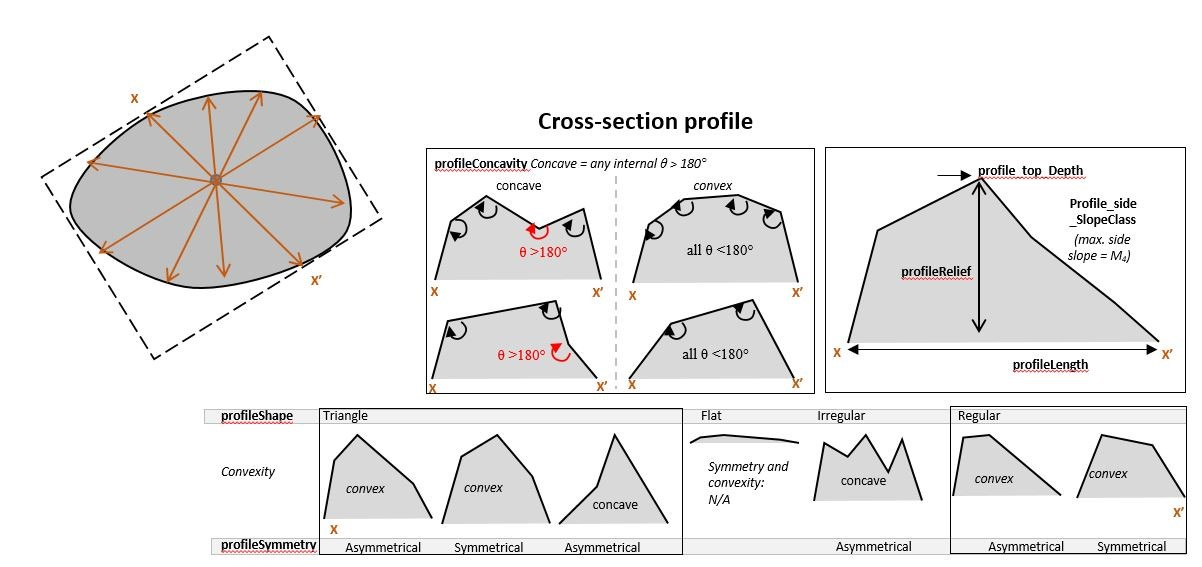
For each bathymetric high feature, if its area is larger than a user-defined threshold, five cross-section profiles passing through the polygon centre with an equal angle-interval are generated; otherwise only one cross-section profile passing through the polygon centre is generated.
The following attributes are calculated to describe the cross-section profile(s). Note that a complex cross-section is simplified by identifying and linking knick points. The start and end points of a cross-section profile are always selected as knick points.
profieShape: Describe the shape of the cross-section profile
Flat: when the profile or simplified profile has only two knick points (start and end)
Triangle: when the profile or simplified profile has three knick points
Irregular: when the profile or simplified profile has more than three knick points and the profile is concave in the profileConcavity attribute
Regular: when the profile or simplified profile has more than three knick points and the profile is convex in the profileConcavity attribute
profileSymmetry: Describe the symmetry of the cross-section profile
Symmetric: when the profile’s skewness is < 0.2
Asymmetic: when the profile’s skewness is >= 0.2
NA: when the profileShape attribute is Flat
profileConcavity: Describe the concavity of the cross-section profile
Concave: when the polygon formed by the knick points of the profile or simplified profile has an angle > 180°
Convex: when the polygon formed by the knick points of the profile or simplified profile does not have any angles > 180°
NA: when the proileShape attribute is Flat
profile_top_SlopeClass: Describe the category of the slope-gradient of the top of the profile or simplified profile, which is calculated as the mean of the slope-gradients of all of the profile’s non-side segments
Flat: slope-gradient < 5
Gentle: slope-gradient 5-10
Moderate: slope-gradient 10-30
Steep: slope-gradient > 30
no top: when the profileShape attribute is Triangle
NA: when the profileShape attribute is Flat
profile_side_SlopeClass: Describe the category of the slope-gradient of side of the profile or simplified profile, which is calculated as the weighted average of the slope-gradients of the two profile’s side segments. The weights are the inverse distances (segment lengths).
Flat: slope gradient < 5
Gentle: slope gradient 5-10
Moderate: slope gradient 10-30
Steep: slope gradient > 30
NA: when the profileShape attribute is Flat
profile_top_Depth: Describe the water depth of the top of the profile or simplified profile, which is calculated at the shallowest of the profile’s knick points
profileRelief: Describe the topographic relief of the profile or simplified profile, which is calculated as the depth range between the shallowest and the deepest of the profile’s knick points
profileLength: Describe the length of the profile or simplified profile, which is calculated as the distance between the start point and end point of the profile
 1from arcpy import env
 2from arcpy.sa import *
 3arcpy.CheckOutExtension("Spatial")
 4
 5# import the python toolbox
 6arcpy.ImportToolbox("C:/semi_automation_tools/User_Guide/Tools/AddAttributes.pyt")
 7
 8env.workspace = 'C:/semi_automation_tools/testSampleCode/Gifford.gdb'
 9env.overwriteOutput = True
10
11# specify input and output parameters of the tool
12inFeat = 'test_BH'
13inBathy = 'gifford_bathy'
14areaT = '300000 SquareMeters'
15tempFolder = 'C:/semi_automation_tools/temp4'
16
17# execute the tool
18arcpy.AddAttributes.Add_Profile_Attributes_High_Tool(inFeat,inBathy,areaT,tempFolder)