Classify Bathymetric Low Features
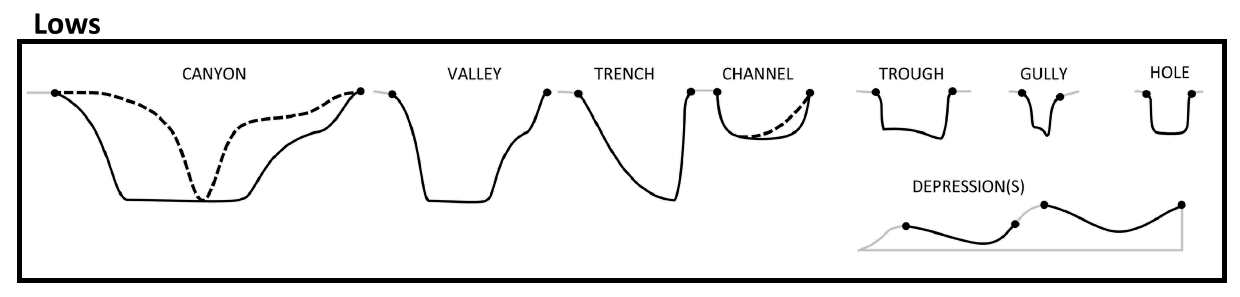
This tool classifies each bathymetric low feature into one of these 8 morphology feature types:
|
|
Based on the attibutes calculated using AddAttributes Toolset.
The classification scheme is based on this publication [Dove et al., 2020].
The classification rules largely follow the [Dove et al., 2020] scheme, with some modifications. They are as follows:
 1if lwRatio >= lwRatioT:
 2    if headDepth >= headDepthT:
 3        if (profileSymmetry == asymmetric) and ((profileSlope == "Steep") or (profileSlope == "Moderate")):
 4            feature_type = "Trench"
 5        else:
 6            feature_type = "Trough"
 7    elif (meanSegmentSlope >= meanSegmentSlopeT1) and ((profileSide == "Steep") or (profileSide == "Moderate")):
 8        feature_type = "Gully"
 9    elif (hfDepthRange >= hfDepthRangeT) and (meanSegmentSlope >= meanSegmentSlopeT2):
10        fetature_type = "Canyon"
11    else:
12        feature_type = "Valley"  # or Channel; TODO; confirm logic
13elif (polygonCircularity >= circularityT) and (profileSide is "Steep"):
14    feature_type = "Hole"
15else:
16    feature_type = "Depression"
Where:
lwRatio is the LengthWidthRatio attribute
headDepth is the headDepth attribute
profileSymmtry is the profileSymmetry attribute
profileSlope is evaluated either from the profile_bottom_SlopeClass attribute when the profileShape is not Triangle or from the profile_side_SlopeClass attribute when the profileShape is Triangle or from the combination of both attributes
hfDepthRange is the head_foot_depthRange attribute
meanSegmentSlope is the mean_segment_slope attribute
profileSide is the profile_side_SlopeClass attribute
polygonCircularity is the Cirularity attribute
Note that a range of default values have been set for those threshold values. Also note that meanSegmentSlopeT2 must be smaller than meanSegmentSlopeT1.
 1from arcpy import env
 2from arcpy.sa import *
 3arcpy.CheckOutExtension("Spatial")
 4
 5# import the python toolbox
 6arcpy.ImportToolbox("C:/semi_automation_tools/User_Guide/Tools/ClassificationFeature.pyt")
 7
 8env.workspace = 'C:/semi_automation_tools/testSampleCode/Gifford.gdb'
 9env.overwriteOutput = True
10
11# specify input and output parameters of the tool
12inFeat = 'test_BL'
13LWR = 8.0
14hfDR = 600.0 # in meters
15hD = 4000.0 # in meters
16shapeC = 0.5
17segmentS1 = 7.0 # degree
18segmentS2 = 2.0 # degree
19
20### execute the tool with default parameters
21##arcpy.ClassifyFeatures.Classify_Bathymetric_Low_Features_Tool(inFeat)
22# execute the tool with user-defined parameters
23arcpy.ClassifyFeatures.Classify_Bathymetric_Low_Features_Tool(inFeat,LWR,hD,segmentS1,hfDR,segmentS2,shapeC)