Morphological Surface Tool Slope
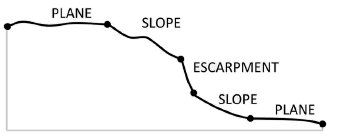
This tool classifies an area into three morphology surface categories: Plane, Slope and Escarpment from a slope gradient grid. The three surface categories are classified based on the values of slope gradient. Note that the slope gradient grid can be generated from software other than ArcGIS using a neighbourhood size othe than 3 by 3.
The surface classification method is based on the seabed morphology classification scheme published in [Dove et al., 2020].
The followings are the key steps of this tool.
Reclassify the slope gradient raster into a three-class raster based on the following criteria:
If slope gradient <= 2, class = 1 (Plane)
If 2 < slope gradient <= 10, class = 2 (Slope)
If slope gradient > 10, class = 3 (Escarpment)
Apply Majority FIlter to the reclassified raster a number of time using the number_neighbors option of Eight and the majority_definition option of Half. The number of time is defined by the nuMF input parameter.
Convert the filterred raster into polygons.
Select the polygons with areas smaller than the Area Threshold parameter and merge them into their largest neighbours to obtain the final surface features as output.
 1import arcpy
 2from arcpy import env
 3from arcpy.sa import *
 4arcpy.CheckOutExtension("Spatial")
 5
 6# import the python toolbox
 7arcpy.ImportToolbox("C:/semi_automation_tools/User_Guide/Tools/Surface.pyt")
 8
 9env.workspace = 'C:/semi_automation_tools/testSampleCode/Gifford.gdb'
10env.overwriteOutput = True
11
12# specify input and output parameters of the tool
13inSlope = 'gifford_slope'
14outFeat = 'gifford_surface1'
15areaT = '1 SquareKilometers'
16numMajorityFilter = 3
17tempWorkspace = 'C:/Users/u56061/Documents/ArcGIS/Projects/UserGuide/UserGuide.gdb'
18
19
20# execute the tool with user-defined parameters
21arcpy.Surface.SurfaceToolSlope(inSlope,outFeat,areaT,numMajorityFilter,tempWorkspace)