TPI LMI Tool Bathymetric High
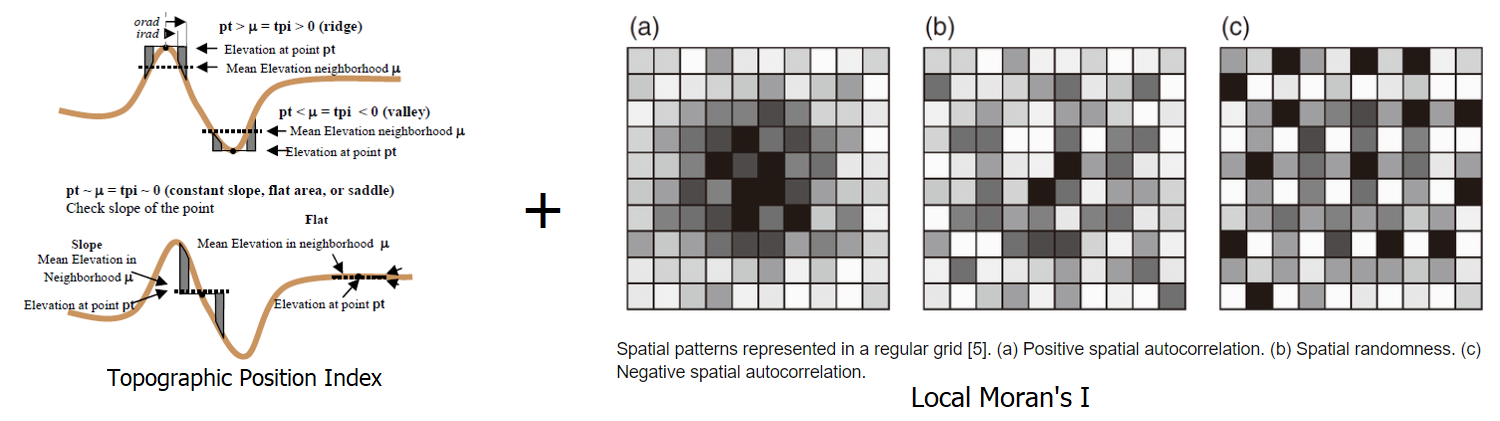
This tool maps bathymetric high features from bathymetry data using a combination of Topographic Position Index (TPI) [Weiss, 2001] and Local Moran’s I (LMI) [MORAN, 1950] method. Positive TPI usually indicates bathymetric high location. Positive LMI usually indicates a spatial pattern of positive (higher than average) local autocorrelation (e.g., in this case a similar local pattern of higher bathymetry values).
The followings are the key steps of this tool:
Calculate TPI from the input bathymetry raster using the TPI Circle Radius parameter
Calculate the TPI thresholds using equation (1), where c is the TPI STD Scale Large parameter or the TPI STD Scale Small parameter, mean_TPI and STD_TPI are the mean and standard deviation statistics of the TPI raster
(1)¶\[TPI\_threshold = mean\_TPI + c * STD\_TPI\]Select the first set of areas that have TPI values greater than the TPI STD Scale Large threshold
Select the second set of areas that have TPI values greater than the TPI STD Scale Small threshold
These two sets of areas and the bathymetry data are used together to select the ‘core’ areas of bathymetric high features, through GIS overlay and selection analyses
These ‘core’ areas are substracted from the bathymetry data
Calculate LMI from the substracted bathymetry raster using the LMI Weight File parameter
Calculate the LMI thresholds using equation (2), where c is the LMI STD Scale parameter , mean_LMI and STD_LMI are the mean and standard deviation statistics of the LMI raster
(2)¶\[LMI\_threshold = mean\_LMI + c * STD\_LMI\]Select locations from the LMI raster that have LMI values greater than the LMI threshold. These locations (areas) are regarded as the remaining parts of bathymetric high features
Merge the ‘core’ areas and the ‘remaining’ parts of bathymetric high features to form individual bathymetric high features
Remove the feature polygons with areas smaller than the Area Threshold parameter to obtain the final set of bathymetric high features
The TPI radius should be large enough to capture the largest bathymetric high features in the dataset. For example, for a 5m resolution bathymetry raster, a radius of 50 cells should be used to capture any bathymetric high features that is smaller than 500m in length. Users should also experiment the TPI STD Scale Large, the TPI STD Scale Small, the LMI STD Scale and the Area Threshold parameters to obtain an optimal output solution.
 1from arcpy import env
 2from arcpy.sa import *
 3arcpy.CheckOutExtension("Spatial")
 4
 5# import the python toolbox
 6arcpy.ImportToolbox("C:/semi_automation_tools/User_Guide/Tools/BathymetricHigh.pyt")
 7
 8env.workspace = 'C:/semi_automation_tools/testSampleCode/Gifford.gdb'
 9env.overwriteOutput = True
10
11# specify input and output parameters of the tool
12inBathy = 'gifford_bathy'
13outTPI = 'gifford_tpi100'
14outFeat = 'tpi100_1_05std_lmi_1std_30km2_BH'
15areaT = '30 SquareKilometers'
16tpiRadius = 100
17tpiSTDLarge = 1.0
18tpiSTDSmall = 0.5
19weightFile = 'C:/semi_automation_tools/User_Guide/Tools/weight_3.txt'
20lmiSTD = 1.0
21tempWorkspace = 'C:/Users/u56061/Documents/ArcGIS/Projects/UserGuide/UserGuide.gdb'
22
23# execute the tool
24arcpy.BathymetricHigh.TPI_LMITool(inBathy,outTPI,outFeat,areaT,tpiRadius,tpiSTDLarge,tpiSTDSmall,weightFile,lmiSTD,tempWorkspace)