Update Feature Boundary
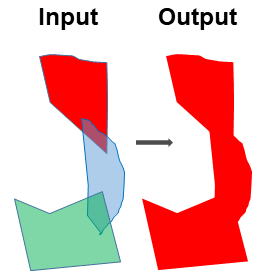
Two or multiple feature classes may have overlapped polygons. This tool merges the overlapped polygons into one and update its boundary.
The followings are the steps:
Merge the input featureclasses using ArcGIS Merge tool . This stacks the polygons on top of each other without dissoving the boundaries
Add a temporary field to the merged featureclass and assign it a single value
Dissolve the merged featureclass using ArcGIS Dissolve tool, with the temporary field and the SINGLE_PART option
Note that this accessory tool is clearner than ArcGIS Update tool because the duplicates have been removed. In addition, this tool can update feature boundary for more than two input datasets.
 1import arcpy
 2from arcpy import env
 3
 4# import the python toolbox
 5arcpy.ImportToolbox("C:/semi_automation_tools/User_Guide/Tools/Accessory_Tools.pyt")
 6
 7env.workspace = 'C:/semi_automation_tools/testSampleCode/Gifford.gdb'
 8env.overwriteOutput = True
 9
10# specify input and output parameters of the tool
11inFeats = 'test1;test2'
12dissolvedFeat = 'dissolvedFeat'
13
14
15# execute the tool with user-defined parameters
16arcpy.AccessoryTools.Update_Features_Tool(inFeats,dissolvedFeat)