Connect Nearby Linear Features
A linear bathymetric high or low feature (e.g., ridge or valley/channel) is sometimes broken into multiple smaller and disconnected features due to several possible reasons:
deficiency in the bathymetric data
deficiency in the mapping method
natural local processes such as erosion and deposition
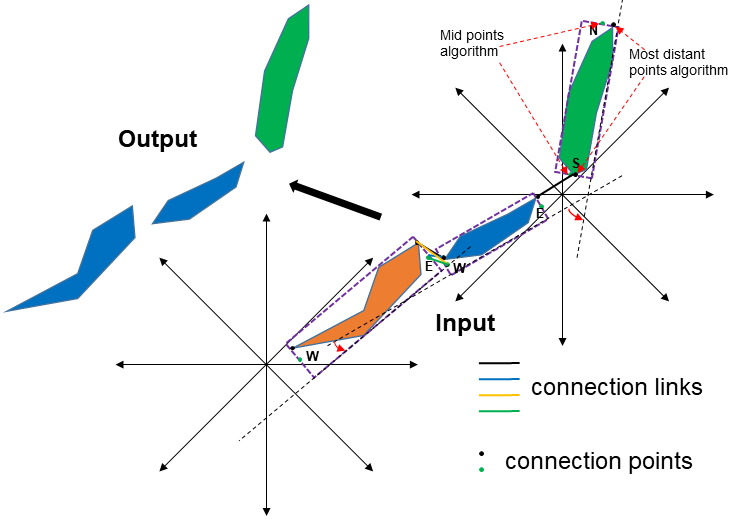
Ideally, these disconnected features should be merged to form a single integrated linear feature to facilitate the subsequent attribute generation and classification. This tool is used to connect (or merge) two or multiple bathymetric high or low features that satisfying a number of conditions based on distance and orientation. The first step of the process is to identify the potential connection points for each feature. There are three algorithms available for this step.
The Mid points to Minimum Bounding Rectangle algorithm identifies the connection points as the middle points on the correponding sides of the minimum bounding rectangle. Based on the orientation of the feature, these sides could either be North and South sides or East and West sides
The Most distant points on feature algorithm identifies the connection points as the intercepted locations between the feature and the corresponding sides of the minimum bounding rectangle
The Mid points and Most distant points algorithm identifies two sets of connection points using the above two algorithms
The Mid points algorithm
The Most distant points algorithm
The next step is to generate connection links from these connection points. These links are created from each feature to each of its nearby features that are within the distance threshold. In the following step, the tool selects a subset of these links based on certain criteria. These criteria are determined by the distance threshold, the angle threshold, the distance weight and the angle weight. In this step, there are six link directions to consider when determining which nearby features (if any) should be connected:
|
|
For example, for the west-to-north link direction considers whether a feature orientated (from the east) to the west with a nearby feature orientated from the north (to the south) should be connected. Finally, the nearby features identified from this subset of suitable connection links are merged.
When there are a large number of features in the dataset, the Area Threshold and Length to Width Ratio Threshold parameters can be used to select a subset of features for the above connection process.
Note that the output featureclasses from the Merge Connected Features Tool can be used as the input to this tool.
 1from arcpy import env
 2from arcpy.sa import *
 3arcpy.CheckOutExtension("Spatial")
 4
 5# import the python toolbox
 6arcpy.ImportToolbox("C:/semi_automation_tools/User_Guide/accessory_tools/Accessory_Tools.pyt")
 7
 8env.workspace = 'C:/semi_automation_tools/testSampleCode/Point_Cloates.gdb'
 9env.overwriteOutput = True
10
11# specify input and output parameters of the tool
12inFeat = 'pc_tpi10_075std_45m2'
13distT = '200 Meters'
14angleT = 20
15distW = 2
16angleW = 1
17conOption = 'Mid points on Minimum Bounding Rectangle'
18outFeat = 'pc_tpi10_075std_45m2_connected'
19tempFolder = 'C:/semi_automation_tools/temp'
20
21# execute the tool with user-defined parameters
22arcpy.AccessoryTools.Connect_Nearby_Linear_Features_Tool(inFeat,distT,angleT,distW,angleW,conOption,'#','#',outFeat,tempFolder)