Add Shape Attributes Low
This tool add a number of shape attributes to the input bathymetric low feature class as described in Wirth, M.A. Shape Analysis & Measurement.
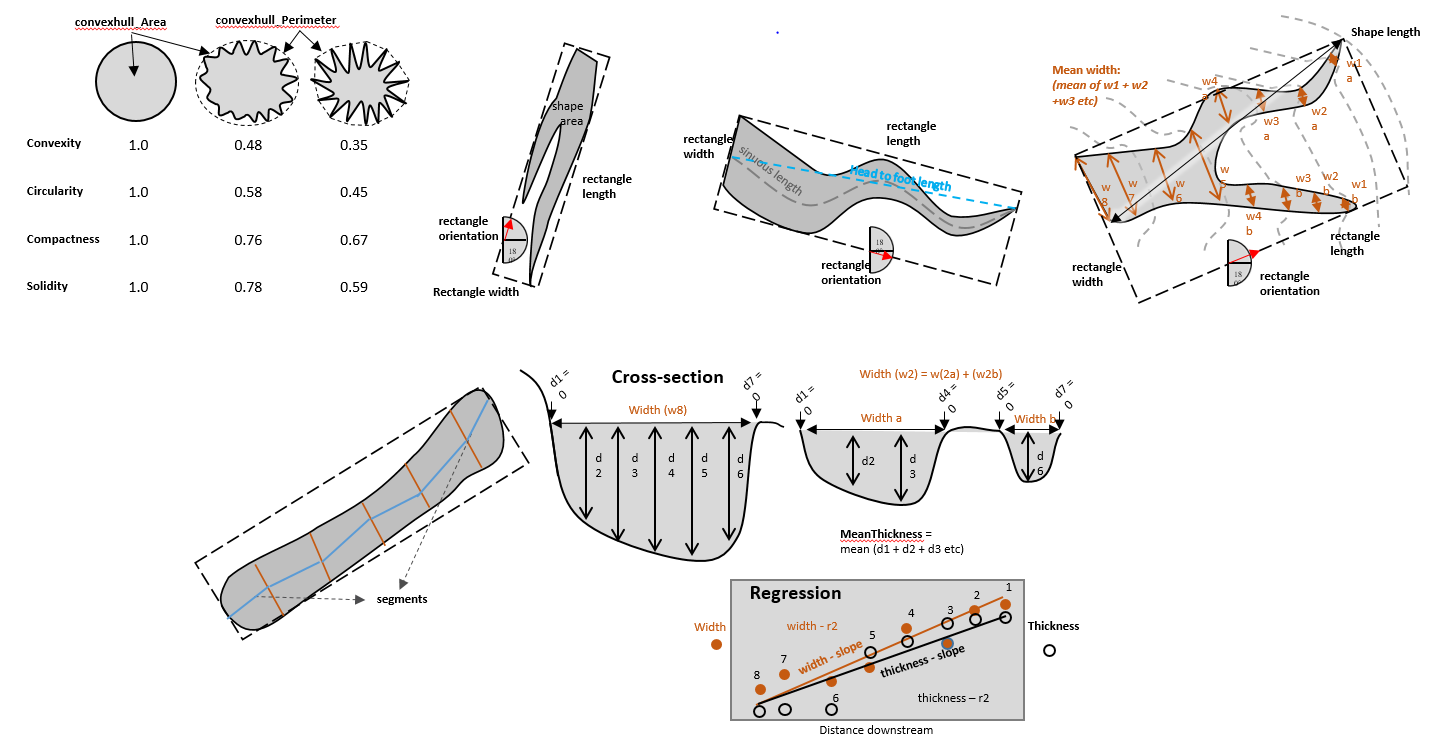
The following attributes are calculated to describe the polygon shape of each bathymetric low feature.
head_foot_length: the euclidean distance between the head and the foot of the feature polygon, along the long axis
sinuous_length: the sinuous distance between two ends of the feature polygon, along the long axis
mean_width: the mean width of the feature polygon, calculated from a number of cross-sections perpendicular to the orientation of the feature polygon
mean_thickness: the mean thickness of the feature polygon, calculated from a number of cross-sections perpendicular to the orientation of the feature polygon. The thickness of a cross-section is calculated as the depth difference between the deeper end of the cross-section and the deepest point on the bottom of the cross-section
mean_width_thickness_ratio: the mean width to thickness ratio of the feature polygon, calculated from a number of cross-sections perpendicular to the orientation of the feature polygon. The width to thickness ratio of each cross-section is calculated as width/thickness
std_width_thickness_ratio: the standard deviation of width to thickness ratio of the feature polygon, calculated from a number of cross-sections perpendicular to the orientation of the feature polygon. The width to thickness ratio of each cross-section is calculated as width/thickness
mean_segment_slope: the mean slope gradient of thalweg segments of the feature polygon. The thalweg segments are the line segments linking the deepest points of the cross-sections perpendicular to the orientation of the feature
width_distance_slope: the slope of the linear regression line between two variables: the widths of the cross-sections and the distances of the cross-sections to the head of the feature polygon
width_distance_correlation: the Pearson correlation coefficient between two variables: the widths of the cross-sections and the distances of the cross-sections to the head of the feature polygon
thick_distance_slope: the slope of the linear regression line between two variables: the thicknesses of the cross-sections and the distances of the cross-sections to the head of the feature polygon
thick_distance_correlation: the Pearson correlation coefficient between two variables: the thicknesses of the cross-sections and the distances of the cross-sections to the head of the feature polygon
Compactness: Describe how compact the feature polygon is. More complex polygon shape has a lower compactness. It is calculated by equation (1), where A is the area of the polygon, P is the perimeter of the polygon
(1)¶\[\frac{4 * \pi * A}{P^2}\]
Sinuosity: Describe the sinuosity of the feature polygon. Larger the value more sinuous the feature polygon is. It is calculated by equation (2)
(2)¶\[\frac{sinuous\_length}{head\_foot\_length}\]
LenghWidthRatio: Describe the length to width ratio of the feature polygon. Larger the value more elongate the feature polygon is. It is calculated by equation (3)
(3)¶\[\frac{sinuous\_length}{mean\_width}\]
Circularity: Describe how close the feature polygon is to a circle. Larger the value closer to a circle the feature polygon is. It is calculated by equation (4), where Pc is the perimeter of the convex hull polygon that bounds the feature polygon.
(4)¶\[\frac{4 * \pi * A}{Pc^2}\]
Convexity: Describe the convexity of the feature polygon. More complex polygon has a lower convexity. It is calculated by equation (5)
(5)¶\[\frac{Pc}{P}\]
Solidity: Describe the solidity of the feature polygon. More complex polygon has a lower solidity. It is calculated by equation (6)
(6)¶\[\frac{A}{Ac}\]
In addition, a number of intermediate attributes are also calculated:
rectangle_Length: the length of the bounding rectangle (by width) that bounds the feature polygon
rectangle_Width: the width of the bounding rectangle (by width) that bounds the feature polygon
rectangle_Orientation: the orientation of the bounding rectangle (by width) that bounds the feature polygon
convexhull_Area: the area of the convex hull that bounds the feature polygon
convexhull_Perimeter: the perimeter of the convex hull that bounds the feature polygon
 1from arcpy import env
 2from arcpy.sa import *
 3arcpy.CheckOutExtension("Spatial")
 4
 5# import the python toolbox
 6arcpy.ImportToolbox("C:/semi_automation_tools/User_Guide/Tools/AddAttributes.pyt")
 7
 8env.workspace = 'C:/semi_automation_tools/testSampleCode/Gifford.gdb'
 9env.overwriteOutput = True
10
11# specify input and output parameters of the tool
12inFeat = 'test_BL'
13inBathy = 'gifford_bathy'
14tempFolder = 'C:/semi_automation_tools/temp4'
15headFeat = 'test_BL_head'
16footFeat = 'test_BL_foot'
17
18# execute the tool
19arcpy.AddAttributes.Add_Shape_Attributes_Low_Tool(inFeat,inBathy,tempFolder,headFeat,footFeat)