Add Topographic Attributes High
This tool add a number of topographic attributes to the input bathymetric high feature class.
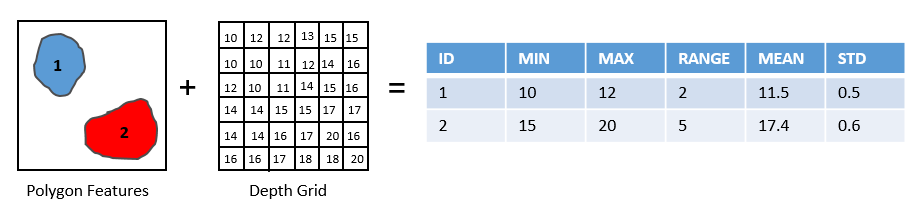
The following attributes are calculated from the bathymetry and slope-gradient rasters to describe the topographic properties of each bathymetric high feature.
minDepth: the minimum water depth within the feature polygon
maxDepth: the maximum water depth within the feature polygon
depthRange: the difference in water depth within the feature polygon, which is calculated by equation (1)
(1)¶\[(maxDepth - minDepth)\]meanDepth: the mean water depth within the feature polygon
stdDepth: the standard deviation of the water depths within the feature polygon
minGradient: the minimum slope-gradient within the feature polygon
maxGradient: the maximum slope-gradient within the feature polygon
gradientRange: the difference in slope-gradient within the feature polygon, which is calculated by equation (2)
(2)¶\[(maxGradient - minGradient)\]meanGradient: the mean slope-gradient within the feature polygon
stdGradient: the standard deviation of the slope-gradients within the feature polygon
 1import arcpy
 2from arcpy import env
 3from arcpy.sa import *
 4arcpy.CheckOutExtension("Spatial")
 5
 6# import the python toolbox
 7arcpy.ImportToolbox("C:/semi_automation_tools/User_Guide/Tools/AddAttributes.pyt")
 8
 9env.workspace = 'C:/semi_automation_tools/testSampleCode/Gifford.gdb'
10env.overwriteOutput = True
11
12# specify input and output parameters of the tool
13inFeat = 'test_BH'
14inBathy = 'gifford_bathy'
15inSlope = 'gifford_slope'
16
17# execute the tool
18arcpy.AddAttributes.Add_Topographic_Attributes_High_Tool(inFeat,inBathy,inSlope)